Showing posts with label ARP. Show all posts

Wednesday, 14 December 2011

TCP/IP Utilities

You can use several utilities to verify TCP/IP function on Windows workstations:

Using the arp utility:
  1. Choose Start--->Run and enter cmd to open the MS-DOS Prompt window.
  2. type "arp -a", you'll get.


The arp utility is primarily useful for resolving duplicate IP addresses. For example, your workstation receives its IP address from a DHCP server, but it accidentally receives the same address as another workstation. Your workstation is trying to determine the MAC address, and it can't do so because two machines are reporting that they have the sane IP address. To display the entire current ARP table, use arp command with -a switch.

Using the netstat Utility:
  1. Open MS-DOS Prompt window
  2. enter "netstat /?", it will show all its coll switches and its functions.
'netstat' with switch '-a' is normally used to get a list of open ports on your own system, i.e. on the local system. This can be particularly useful to check and see whether your system has a Trojan installed or not. Remember, port numbers over 1024 are used by your system to connect to remote computers.
Trojans:  Netbus uses port number 12345 (TCP) and Back Orifice uses port number 31337(UDP)
"netstat -n" is numerical form of -a, its shows ip address of local and remote systems.


Using the ping Utility: We use ping utility for two primary puurposes; to find out if you can reach a host, to find out if a host is responding.
open MS-DOS window
ping hostname or IP address


Using tracert utility : It will show you every router interface a TCP/IP packet passes through on its way to a destination.
  1. open MS-DOS window
  2. enter "tracert hostname( or host's ip address)"
  3. It will respond with a list of DNS names and IP address of routers that the packet is passing through on its way.

 Using Telnet utility:: It  is used to open terminal sessions from remote system to server, it has evolved into a troubleshooting tool.
  1. open MS-DOS, type telnet hostname(or host ip address), make sure this facility is installed in your system. If installed then jump to  4 , otherwise follow the steps.
  2. Control Panel----> Programs-----> "Turn Windows features on or off", a dialog box will appear.
  3. Select telnet client and server or any other service which you want to install.
  4. It will ask for login name and password.
  5. Once login name and password is being verified, a telnet session get established.
  6. If the host supports SSH then use putty.
  7. If the telnet service is not running at the default port number on the host, then use telnet hostname:port number command.

Using nslookup Utility: It allows you to query a name server and quickly find out which name resolves to which IP address.
  1. open MS-DOS window.
  2. enter nslookup example.com 


Tuesday, 13 December 2011

Network Protocols

Transmission Control Protocol (TCP):
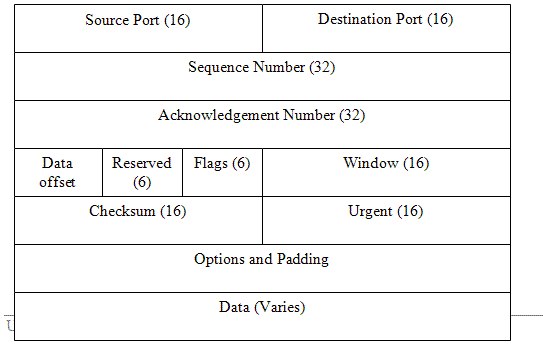
TCP is the transport layer of the protocol and serves to ensure a reliable, verifiable data exchanged between hosts on a network. TCP breaks data into pieces, wraps the pieces with the information needed to identify it as a piece of the original message, and allow the pieces to be reassembled at the receiving end of the communications link. The wrapped and bundled pieces are called Datagrams (or segments).


  • Source port and Destination port ensure that data is sent back and forth to the correct application process running on each machine.
  • Segment Number allows datagrams to be rebuilt in the correct order in the receiving device, and checksum allows the protocol to check whether the data sent is same as data received.
  • Acknowledgement number indicates that the data was received successfully, and Offset specifies the length of the header in 32-bit chunks.
  • Reserved specifies variables that are set aside for future use, it must contain ZEROS, and Flags , these are six one-bit fields that indicate various things, like whether segment is end of higher-layer message, acknowledgement number is significant, sender is requesting that a virtual circuit, data in the segment is urgent.
  • Window provides a way to increase the number of segments transmitted before the sender excepts an acknowledgement, and Urgent gives the location where the urgent data ends.
  • Options and Padding communicates various parameters of TCP virtual circuit, like maximum segment size, and it also ensures that the header ends on a 32-bit boundary so that the offset field makes sense as a whole number.
Internet protocol (IP) :
The network layer portion of the DoD model is called the Internet layer. The main protocol at this layer is the Internet Protocol (IP). IP is considered connectionless; i.e; it does not swap control information in order to establish an end to end connection before starting a transmission. This is known as best effort transmission. and if a packet is lost in transmission, IP must rely on TCP to determine it the data did not arrive successfully.


Address Resolution Protocol (ARP) :

The network layer protocol, ARP, associates the physical hardware address of a network node to its already known IP address. Using ARP, an IP process construct a table that maps ip addresses to mac addresses of nodes on LAN. When a node needs to send a packet to a known IP address on local sub-net, it first checks the ARP cache to see it the physical address information is already present. If so, that address is used and network traffic is reduced.


Internet Control Message Protocol (ICMP) :
It works at the network layer and provides the functions used for Network layer management and control. Routers send ICMP messages to respond to undeliverable datagrams by placing an ICMP message in an IP datagram and then sending the datagram back to the original source. The PING command.

ICMP EXAMPLE


User Datagram Protocol (UDP) :
It is a transport layer connectionless protocol that does not provide the reliability services with TCP but provides best effort transmission services to application protocols.It gives applications a direct interface with IP and the ability to address a specific application protocol running on a host via a port number without setting up an end-to-end connection.